What Payment Methods Can I Use to Donate?
Last updated: September 17, 2026
Choose the payment method that works best for you. Whether you prefer using your card, bank account, or digital wallet, donating is quick and secure. We’re here to make your giving experience as smooth as possible!
Skip to Section:
✅ Accepted Payment Methods | ❌ Unsupported Payment Methods
🔍 Why Don’t the Last 4 Digits of My Payment Method Match?
✅ Accepted Payment Methods
We’re committed to making giving as simple and flexible as possible! Here’s a quick look at the ways you can give:
- 💳 Credit and Debit Cards: We accept major credit cards, such as Visa, Mastercard, Discover, and American Express.
- 🏦 ACH: Connect your bank account securely through Plaid and donate directly from your checking or savings account. (🔗 Setting Up ACH Donations)
-
📱 Digital Wallets: Prefer an even faster checkout experience? You can use Apple Pay or Google Pay to give securely with just a few taps on your phone.
-
Note: You can use digital wallets on mobile devices, but they may not be available on all desktop browsers due to vendor-specific policies.
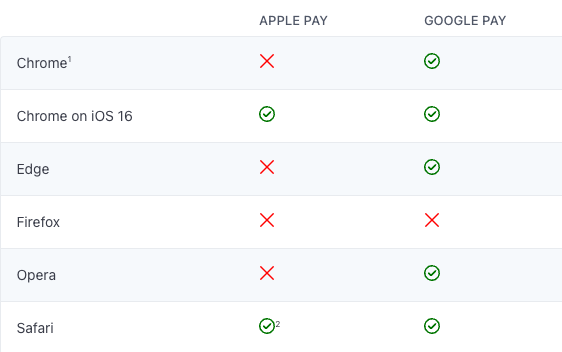
- You can use Apple Pay or Google Pay when you first set up your recurring gift because it approves the very first payment right away. This helps start your gift smoothly.
- However, digital wallets create a new, unique code for each payment and do not store your details for future use.
- ⛔️ Because of this, digital wallets cannot be used to automatically process future donations if you update your payment method in your Donor Profile afterward.
-
Note: You can use digital wallets on mobile devices, but they may not be available on all desktop browsers due to vendor-specific policies.
- 💵 Physical Cash and Checks: Because physical cash and check donations are recorded manually, we recommend reaching out to your nonprofit directly. They can confirm their mailing address, acknowledge receipt of your gift, and provide any other details you might need.
❌ Unsupported Payment Methods
At this time, Zelle, PayPal, Venmo, and Cash App are not supported for donations due to security and processing limitations. We recommend using one of the accepted payment methods listed above to complete your donation.
- 💵 If you’d prefer, you can also donate cash or check directly to your nonprofit, and they can manually process your donation.
- 📦 If you’re looking to donate physical items, such as care kits, used vehicles, or other goods, we recommend reaching out to the organization directly. They’ll be able to guide you on whether they can accept your donation and how best to proceed.
🔍 Why Don’t the Last 4 Digits of My Payment Method Match?
This is typically due to security measures designed to protect your payment information. Please be assured, your donation is still processed securely from the correct account!
🏦 ACH (Bank Transfers)
- The last 4 digits on your confirmation receipt might show a Virtual Account Number (VAN) rather than the last 4 digits of your actual bank account number.
- This can also happen with any bank account numbers saved in your Donor Profile.
📱 Apple Pay
- The last 4 digits on your confirmation receipt may not match your actual credit card number because Apple Pay uses a unique Device Account Number (DAN). This is a security feature designed to protect your card details during the transaction.
- To match a transaction with your actual card, simply open the Wallet app on your device to view the last 4 digits of your real credit card number.